
1
Open the sign-up form
Head to the registration page and start a new account with your email address.
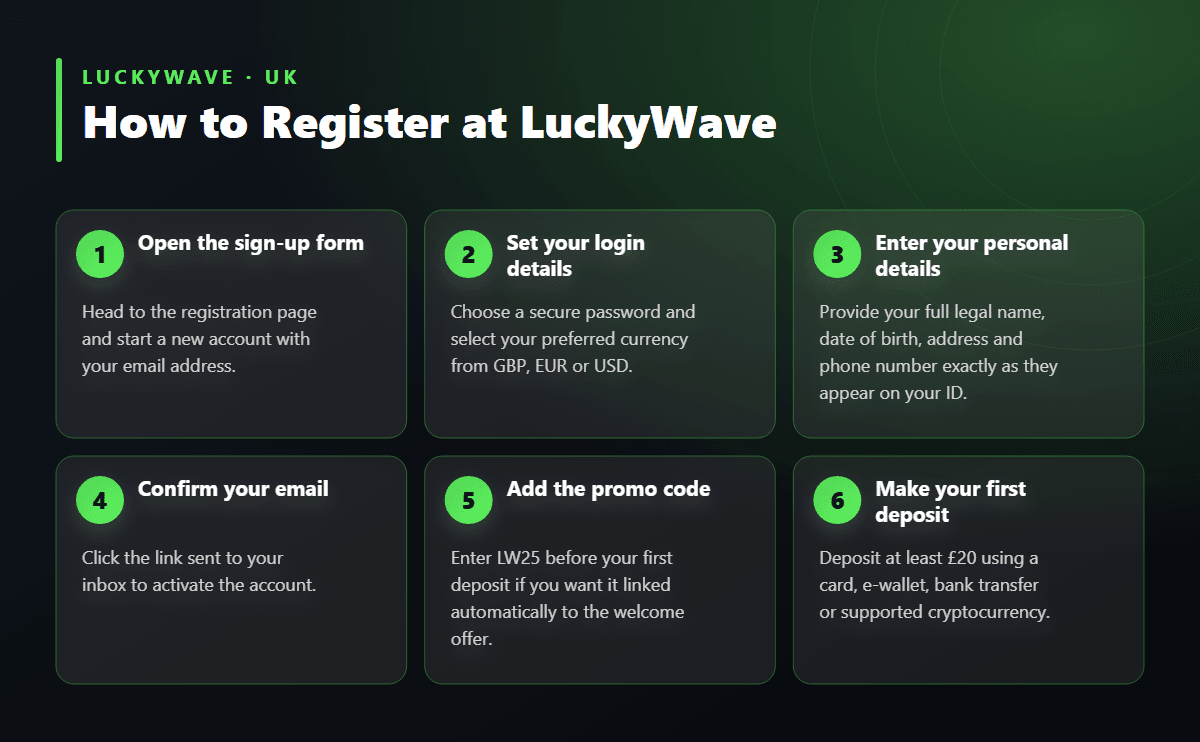
Creating a LuckyWave account takes only a few minutes and asks for nothing more than basic personal details and a valid email address. Once your profile is active, you can make your first deposit from £20 and unlock the welcome package straight away. This guide walks through every stage of registration, from the sign-up form to document verification, so there are no surprises later.
Signing up gives you access to the full games catalogue, the cashier, and the promotions calendar in one place. Without an account you can only browse — deposits, free spins, and live dealer tables all sit behind registration. The process is designed to be quick, and most players finish the form, confirm their email, and reach the lobby within a few minutes.
Beyond access to games, registering is also what lets support staff identify you quickly if you ever need help with a deposit, a bonus, or a withdrawal. A verified account moves through the cashier faster, since the identity checks are already on file rather than requested at the point you try to cash out.
| Detail | Requirement |
|---|---|
| Minimum age | 18 and over |
| Documents for verification | Proof of identity, proof of address |
| Supported currencies | GBP, EUR, USD |
| Minimum deposit | £20 |
| Minimum withdrawal | £50 |
| Promo code | LW25 |
| Welcome wagering requirement | 40x deposit + bonus |
The registration form keeps things simple. You will generally be asked to provide:
Take care to enter your name and date of birth exactly as they appear on your passport or driving licence. A mismatch here is one of the most common reasons verification takes longer than it should, since the documents you submit later need to match the details on file.
Know Your Customer checks protect both the player and the casino, confirming that the account belongs to the person using it and that funds move safely. LuckyWave typically requests this verification before your first withdrawal rather than immediately after sign-up, so you can explore the lobby and claim your welcome bonus without delay.
When verification is requested, have the following ready:
Clear, well-lit scans or photos process faster than blurry phone snapshots. Make sure all four corners of the document are visible and that none of the text is cropped out of frame. Once documents are approved, withdrawals from £50 upward process according to the method chosen — e-wallets typically clear within one to three business days, card withdrawals within three to five business days, and crypto withdrawals within a day. You can check current cashier options and timeframes on the payments page before you deposit.
Follow these steps to open your account and get ready to claim the welcome package.
Registration is open to players aged 18 and over who can provide accurate personal details and valid identification matching those details. One account per person is standard practice across the industry, and attempting to open a second profile under a different name can complicate verification and bonus eligibility. Households sharing an internet connection or address should each register with their own distinct details rather than one shared login.
LuckyWave supports players using GBP, EUR or USD, so you can select the currency that matches your bank account or card and avoid unnecessary conversion when depositing or withdrawing.
Once your account is open and your first deposit lands, the welcome package activates automatically or via a short claim step in the cashier, depending on how you choose to opt in. New players can enter the code LW25 to line up the offer before depositing. The headline offer matches your first deposit at 200% up to £1,200, and the full welcome package — spread across your first few deposits — can reach up to £16,000 together with 300 Free Spins.
The minimum qualifying deposit is £20, and the bonus plus any winnings generated from it carry a 40x wagering requirement on the deposit and bonus combined before withdrawal. Slot spins generally count fully toward clearing that target, while live dealer and table games tend to contribute at a reduced rate or not at all, so it's worth checking which titles count before chasing the requirement on the wrong games. Full terms, including which deposits in the sequence carry which match percentage, are laid out on the bonus page.
Beyond the welcome package, a newly verified account also opens the door to the Daily Streak Boost, the Tuesday, Wednesday and Saturday reload bonuses, FIFA World Cup missions, and up to 15% weekly cashback — all of which sit alongside VIP Club perks like the Lucky Box and Bonus Shop as your account matures.
Most delays during sign-up or verification trace back to a handful of avoidable slips:
If anything about the form or the documents needed isn't clear, the support team is reachable around the clock and can usually resolve a stuck verification well before it becomes frustrating.